Houdini Karma ODIN and NVIDIA OptiX Denoisers

HOUDINI - Karma Denoisers

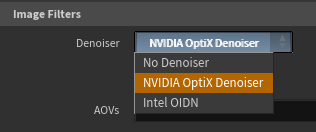
Karma support Intel OIDN and NVIDIA OptiX denoisers:

However, OptIX only works on NVIDIA GPUs, so please select XPU rendering and an “OB” GPU machine.  OIDN will work on both "GM" CPU and “OB” GPU machines.

    • Related Articles

    • HOUDINI - LOPs Submitter - Proper USD Authoring for Husk Rendering - GridMarkets Pipeline 2.0

      Introduction When the GridMarkets Submit > GridMarkets Controls > Project Management > Use Husk option is activated any jobs submitted will be run directly using Husk on the GridMarkets machines. Here are some things to know when starting rendering: ...
    • HOUDINI - Solaris USD workflow (ROPs workflow)

      NOTE - this workflow has been superseded by our LOPS Submitter, so please follow this approach if that doesn't work for you and let us know via support@gridmarkets.com GridMarkets render submit node cannot directly be placed into LOP network. Please ...
    • HOUDINI - Tutorials for GridMarkets

      Here is a list of tutorials that can help solve issues and get you started using GridMarkets Houdini service. GridMarkets Quick Start Tutorials Quick guide to submitting a job: Brief introduction to the basic setup for a simulation submission: A ...
    • HOUDINI PLUGIN RELEASE NOTES

      Here is a log of our Houdini related enhancements . . .
    • HOUDINI + REDSHIFT - changing log verbosity

      How to change Redshift log verbosity in Houdini Set "Redshift_setLogLevel" command in the Pre-Render Script section of the Redshift ROP with the desired flag (please consult the table below for meaning of the different flags): Redshift_setLogLevel -L ...